
SaaS vs PaaS vs IaaS vs DaaS: Which Cloud Service is Right for You?
The global shift toward cloud computing has permanently transformed the architecture of modern business operations. No longer a forward-looking experiment, cloud infrastructure is the standard engine driving scalability, agility, and modern product delivery. However, entering the cloud market exposes organizations to a complex matrix of acronyms, service layers, and shared responsibility models.
Selecting the incorrect cloud deployment archetype can result in massive technical debt, unoptimized operational expenditures (OpEx), compromised security configurations, or severe operational friction. Conversely, selecting the ideal model empowers engineering teams, protects financial resources, and guarantees structural resilience. This comprehensive architectural deep-dive evaluates the four foundational paradigms of modern cloud computing: Software as a Service (SaaS), Platform as a Service (PaaS), Infrastructure as a Service (IaaS), and Desktop as a Service (DaaS).
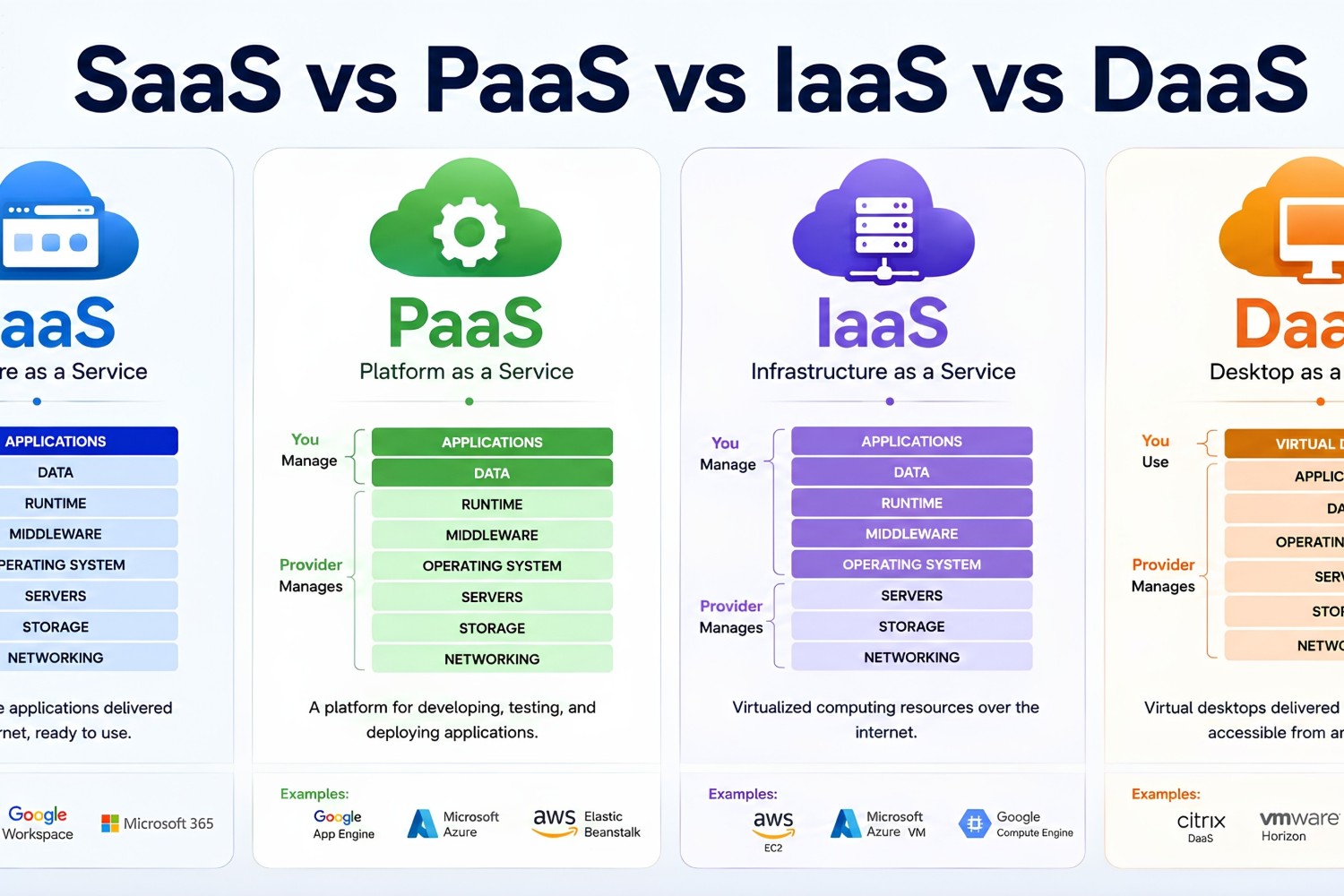
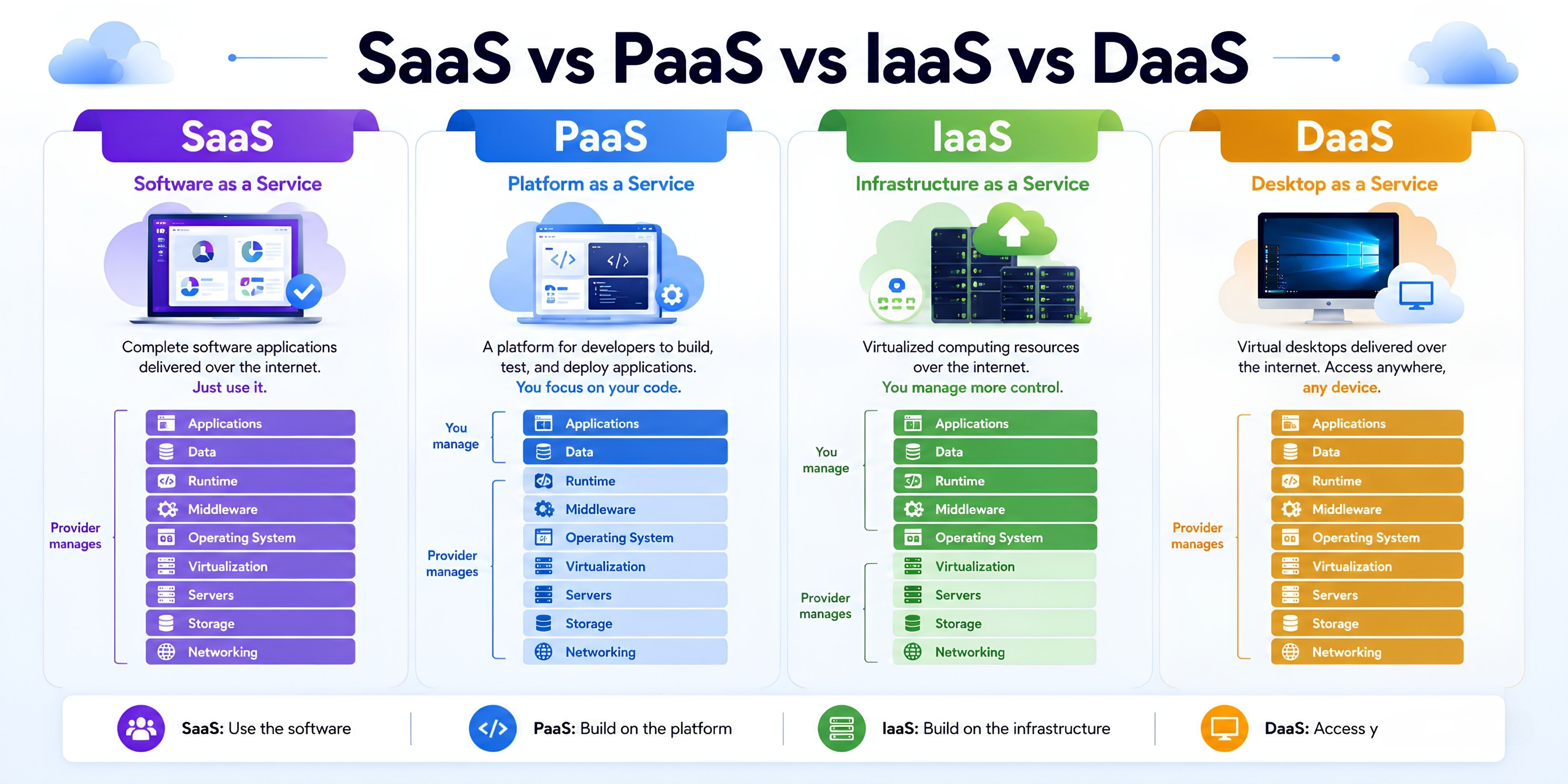
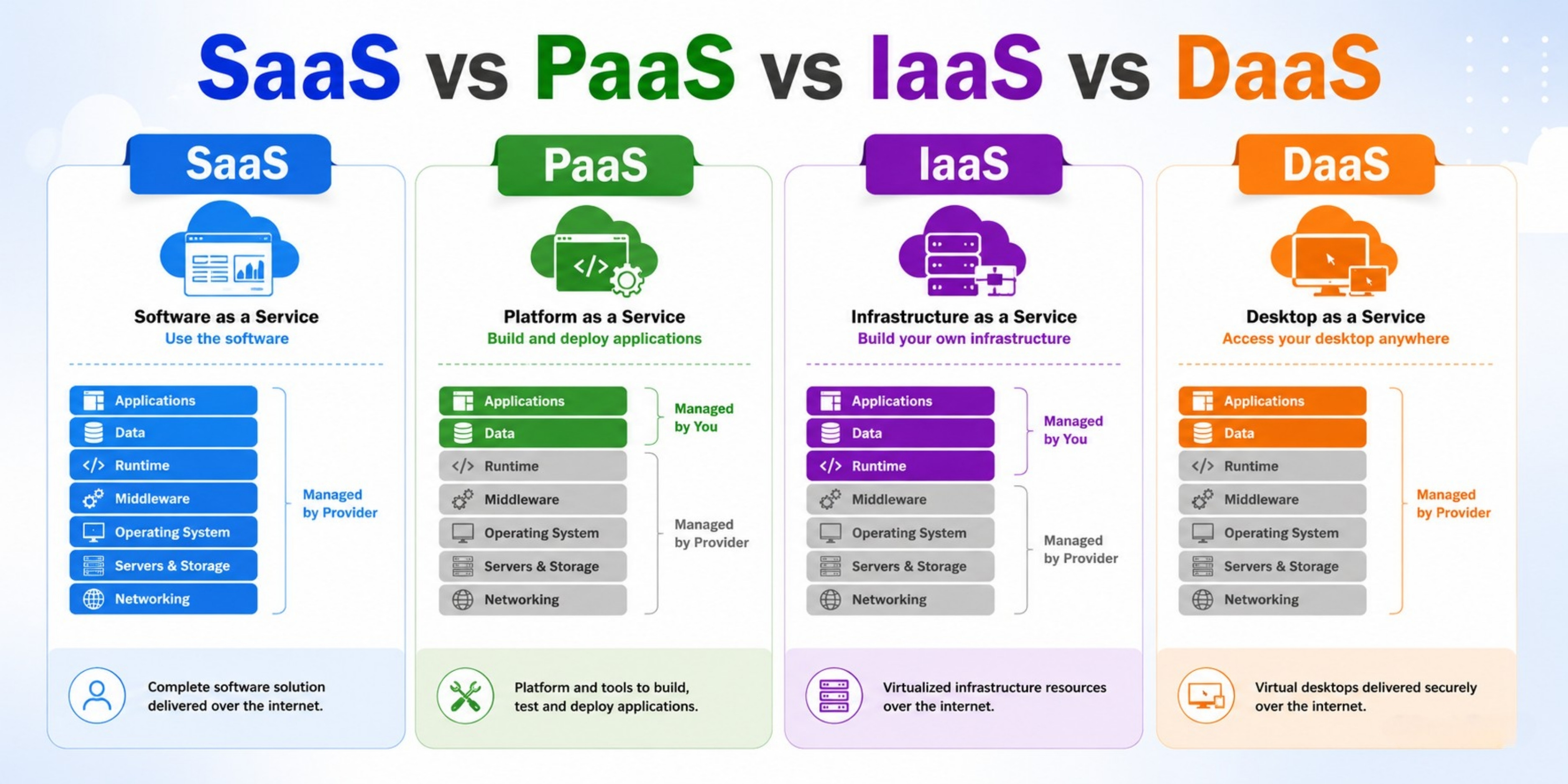
The primary delineator among SaaS, PaaS, IaaS, and DaaS is the line of demarcation within the shared responsibility model. Choosing between them dictates exactly how much infrastructure your internal engineering teams must actively build, configure, and manage versus how much is offloaded to a third-party cloud provider.
1. Analyzing Software as a Service (SaaS)
What is SaaS?
Software as a Service (SaaS) represents the highest layer of cloud abstraction and is the most ubiquitous model for end-users. SaaS delivers complete, fully functional software applications over a web browser or client interface on a subscription basis. Users do not build, deploy, host, patch, or configure anything within the software’s technical architecture; they simply consume the service.
The Technical Stack & Management Boundary
Under the SaaS delivery model, the vendor retains absolute ownership over the entire technology stack. They manage the physical data centers, network architecture, compute hardware, operating systems, data storage, application code updates, security protections, and availability SLAs. The customer’s sole responsibility is the configuration of user access permissions, identities, data management policies, and basic application settings.
Core Advantages of SaaS
- Instant Implementation: Zero setup overhead. Users can log into the software and begin extracting value immediately upon account creation.
- Cross-Device Accessibility: Because these systems run natively in web browsers, users can access their full workflows securely from any device or operating system.
- Automated Upgrades: Feature additions, performance improvements, and security updates are deployed seamlessly by the vendor without requiring user downtime.
Limitations & Operational Challenges
- Total Lack of Data Control: Your mission-critical corporate data resides within a third-party environment, requiring complete trust in the vendor’s security protocols.
- Integration and Rigidity Issues: SaaS platforms offer fixed feature sets. Customizing workflows beyond the vendor’s predefined API parameters or UI configuration toggles is often impossible.
Prominent Industry Examples
- Google Workspace (Gmail, Drive, Docs)
- Salesforce CRM
- Microsoft 365
- Slack / Zoom
- Modern Platform as a Service (PaaS)
What is PaaS?
Platform as a Service (PaaS) moves the abstraction line up the stack, entirely hiding the underlying operating system, runtime, middleware, and hardware provisioning layers. PaaS delivers a holistic, cloud-based framework optimized for application developers. It allows engineers to focus entirely on writing high-quality code without spending time on system administration, disk provisioning, or network security patching.
SaaS vs PaaS vs IaaS vs DaaS
The Technical Stack & Management Boundary
With PaaS, the provider delivers a fully functional runtime environment (such as a pre-configured Node.js, Python, Java, or .NET environment). The provider manages the underlying servers, operating systems, automatic scaling, load balancers, and database clusters. The developer’s responsibility begins and ends with application deployment and configuration management. You write the code, push it to the platform (often via a simple Git hook or container image), and the platform handles execution, availability, and scaling automatically.
Core Advantages of PaaS
- Accelerated Time-to-Market: Developers avoid spending weeks provisioning servers and instead deploy functional applications in minutes.
- Built-In Automated Scaling: PaaS systems can automatically scale application instances up or down based on incoming request volume or CPU utilization without manual server setup.
- Drastically Reduced Administrative Overhead: Eliminates the need for a dedicated team of systems administrators to manage security updates and OS patches.
Limitations & Operational Challenges
- Vendor Lock-In Risk: Applications built around vendor-specific PaaS ecosystems can be extremely difficult and expensive to migrate to alternative clouds.
- Restricted Environment Customization: If an application requires custom OS modules or specific low-level system calls, a standardized PaaS environment may block execution.
Prominent Industry Examples
- Heroku
- AWS Elastic Beanstalk
- Google App Engine
- Vercel
3. Understanding Infrastructure as a Service (IaaS)
What is IaaS?
Infrastructure as a Service (IaaS) sits at the foundation of the cloud computing taxonomy. It represents the direct, virtualized abstraction of physical hardware. Under an IaaS delivery model, a cloud vendor provides on-demand access to fundamental computing building blocks over the internet: raw virtual or bare-metal servers, storage volumes, network architectures, firewalls, and hypervisors.
With IaaS, you bypass the massive capital expenditure (CapEx) of purchasing physical server racks, configuring real-world cooling systems, and designing physical data center redundancies. Instead, you rent these resources on a pay-as-you-go consumption framework, while retaining absolute configuration control over everything running on top of that infrastructure.
The Technical Stack & Management Boundary
In an IaaS environment, the provider owns and maintains the physical data centers, host servers, storage arrays, and physical networking hardware. The client assumes immediate responsibility at the operating system (OS) layer. This means your team is responsible for selecting, licensing, installing, and patching the OS (e.g., Linux distributions, Windows Server), configuring middleware, provisioning database engines, establishing runtime environments, and writing the actual application logic.
Core Advantages of IaaS
- Absolute Control & Customization: Engineering teams can tune the kernel, modify low-level OS variables, design bespoke network topographies (VPCs, subnets), and implement granular access controls.
- Dynamic Elasticity: Programmatic provisioning via Infrastructure as Code (IaC) allows instances to auto-scale dynamically to accommodate sharp, unpredictable spikes in traffic.
- CapEx to OpEx Transformation: Replaces heavy up-front physical hardware investments with highly predictable, utility-style monthly operational costs.
Limitations & Operational Challenges
- High Operational Overhead: Because you control the OS, your system administrators must constantly execute software patches, handle security vulnerabilities, and monitor server health.
- Complex Maintenance Matrix: Misconfigurations in network access control lists (ACLs) or open ports can expose entire infrastructure surfaces to malicious actors.
Prominent Industry Examples
- Amazon Web Services (AWS) EC2
- Google Compute Engine (GCE)
- Microsoft Azure Virtual Machines
- DigitalOcean Droplets
4. Investigating Desktop as a Service (DaaS)
What is DaaS?
Desktop as a Service (DaaS) is a specialized cloud service model where a cloud vendor provisions, manages, and streams secure virtual desktops to end-users over the internet. Built upon Virtual Desktop Infrastructure (VDI) principles, DaaS decouples the desktop operating system, user data, and compute workloads from physical employee hardware, hosting them entirely in a secure cloud data center.
SaaS vs PaaS vs IaaS vs DaaS
The Technical Stack & Management Boundary
The DaaS provider manages the backend infrastructure, including hypervisors, server hardware, storage clusters, and network configurations. The enterprise IT department handles the configuration of the virtual desktops: choosing the operating system (typically Windows or Linux), installing corporate applications, deploying endpoint security tools, managing user profiles, and establishing access control policies.
Core Advantages of DaaS
- Centralized Corporate Security: Sensitive business data never sits locally on an employee’s physical laptop. If a physical device is stolen, corporate assets remain completely secure in the cloud.
- Simplified Remote Onboarding: IT departments can provision a secure, fully compliant corporate desktop environment for a new remote hire in minutes, accessible from any personal device.
- Hardware Life Extension: Reduces hardware expenses by allowing legacy computers to run high-performance workloads, as all processing power is offloaded to the cloud.
Limitations & Operational Challenges
- Strict Internet Dependency: If an employee experiences a local network outage, their access to their corporate operating system and files drops instantly.
- Network Latency Sensitivities: High-latency connections can introduce visible lag between mouse movements and screen updates, impacting user experience.
Prominent Industry Examples
- Amazon WorkSpaces
- Microsoft Azure Virtual Desktop
- Citrix DaaS
- VMware Horizon Cloud
Comprehensive Architectural Comparison Matrix
To help visualize where responsibilities lie across these four distinct methodologies, review this architectural comparison framework:
| Operational Layer | On-Premises | IaaS | PaaS | DaaS | SaaS |
| Applications | You Manage | You Manage | You Manage | You Manage | Vendor Manages |
| Data & Identity | You Manage | You Manage | You Manage | You Manage | You Manage |
| Runtime / OS | You Manage | You Manage | Vendor Manages | Shared Control | Vendor Manages |
| Virtualization | You Manage | Vendor Manages | Vendor Manages | Vendor Manages | Vendor Manages |
| Compute / Servers | You Manage | Vendor Manages | Vendor Manages | Vendor Manages | Vendor Manages |
| Networking / Storage | You Manage | Vendor Manages | Vendor Manages | Vendor Manages | Vendor Manages |
Decision Framework: Which Service Fits Your Business?
Selecting the optimal model requires balancing your operational constraints across three key areas: internal technical capabilities, security compliance requirements, and your financial model.
When to Choose IaaS
IaaS is the ideal path for mature organizations requiring maximum control over complex system architectures. Choose IaaS if your business runs bespoke, legacy monolithic systems that must be migrated via lift-and-shift methods, if you are building proprietary database architectures, or if your applications depend on highly custom operating system optimizations. It demands a skilled DevOps and system administration presence to handle ongoing maintenance safely.
When to Choose PaaS
PaaS is designed for product development teams focused on agility. Choose PaaS if you are launching an initial minimum viable product (MVP), running containerized microservices architectures, or building modern web and mobile backends. PaaS frees your software engineering teams from infrastructure tasks, allowing them to focus entirely on writing feature code and shipping value quickly.
When to Choose SaaS
SaaS should be your default choice for non-differentiating business operations. There is no business value in building your own corporate email, CRM, or general communication platform from scratch. Opting for SaaS allows your company to leverage world-class software instantly, redirecting your technical capital toward applications that generate direct revenue.
When to Choose DaaS
DaaS is the ideal choice for modern remote-first organizations, businesses managing large networks of external contractors, or highly regulated sectors like banking and healthcare. If your IT department needs to secure corporate data across distributed teams without shipping expensive corporate hardware globally, DaaS offers the perfect balance of centralized control and security.
FAQ – SaaS vs PaaS vs IaaS vs DaaS
- What is the main difference between SaaS, PaaS, IaaS, and DaaS?
SaaS provides ready-to-use software, PaaS offers a platform for application development, IaaS delivers virtualized infrastructure resources, and DaaS provides cloud-hosted virtual desktops accessible from anywhere. - Which cloud service model is best for small businesses?
Most small businesses prefer SaaS because it requires minimal technical expertise, lower upfront costs, and easy access to business applications through the internet. - When should developers choose PaaS instead of IaaS?
Developers should choose PaaS when they want to focus on coding and application deployment without managing servers, networking, and infrastructure components. - Is DaaS more secure than traditional desktop environments?
DaaS can be more secure because data is stored in centralized cloud environments, making it easier to implement security policies, backups, and access controls. - Can a company use SaaS, PaaS, IaaS, and DaaS together?
Yes. Many organizations use multiple cloud service models simultaneously. For example, they may use SaaS for productivity tools, PaaS for application development, IaaS for hosting servers, and DaaS for remote workforce management.
Why Choose 1idea Digital Marketing Agency?
At 1idea Digital Marketing Agency, we help businesses build a strong online presence through data-driven digital marketing strategies. Our experienced team specializes in SEO, social media marketing, Google Ads, content marketing, and web optimization to deliver measurable results. We focus on increasing website traffic, generating qualified leads, and improving conversion rates to help your business grow faster.
Key Reasons to Choose Us:
✅ Experienced Digital Marketing Professionals
✅ Customized Marketing Strategies for Every Business
✅ Proven SEO and Google Ranking Expertise
✅ ROI-Focused Google Ads & Social Media Campaigns
✅ Transparent Reporting and Performance Tracking
✅ Affordable Pricing with High-Quality Service
✅ Comprehensive Website SEO Audits and Optimization
✅ Local and International Digital Marketing Solutions
✅ Dedicated Customer Support and Consultation
✅ Long-Term Growth and Brand Development Focus
Whether you’re a startup, small business, or established company, 1idea Digital Marketing Agency provides innovative digital solutions designed to maximize your online visibility and business success.
Final Thoughts
Choosing between SaaS vs PaaS vs IaaS vs DaaS is rarely a binary, mutually exclusive decision. Modern enterprises typically deploy a hybrid strategy that leverages multiple models simultaneously. A single enterprise might leverage SaaS for day-to-day corporate communication (Slack, Google Workspace), adopt a PaaS framework to build and deploy its public-facing core software products rapidly, rely on IaaS pipelines to process large data science workloads, and deploy DaaS architecture to secure access for remote developers.